graph LR
    A[Develop<br>model] --> B[Generate model<br>documentation]
    B --> C[Refine model<br>documentation]
    C --> D[Submit for review]
    C --> B
Get started with the ValidMind Developer Framework
As a model developer, you use the ValidMind Developer Framework to automate the generation of model documentation by uploading documentation artifacts and test results to the ValidMind platform.
What is the developer framework?
ValidMind’s developer framework provides a rich collection of documentation tools and test suites, from documenting descriptions of your dataset to validation testing your models for weak spots and overfit areas.
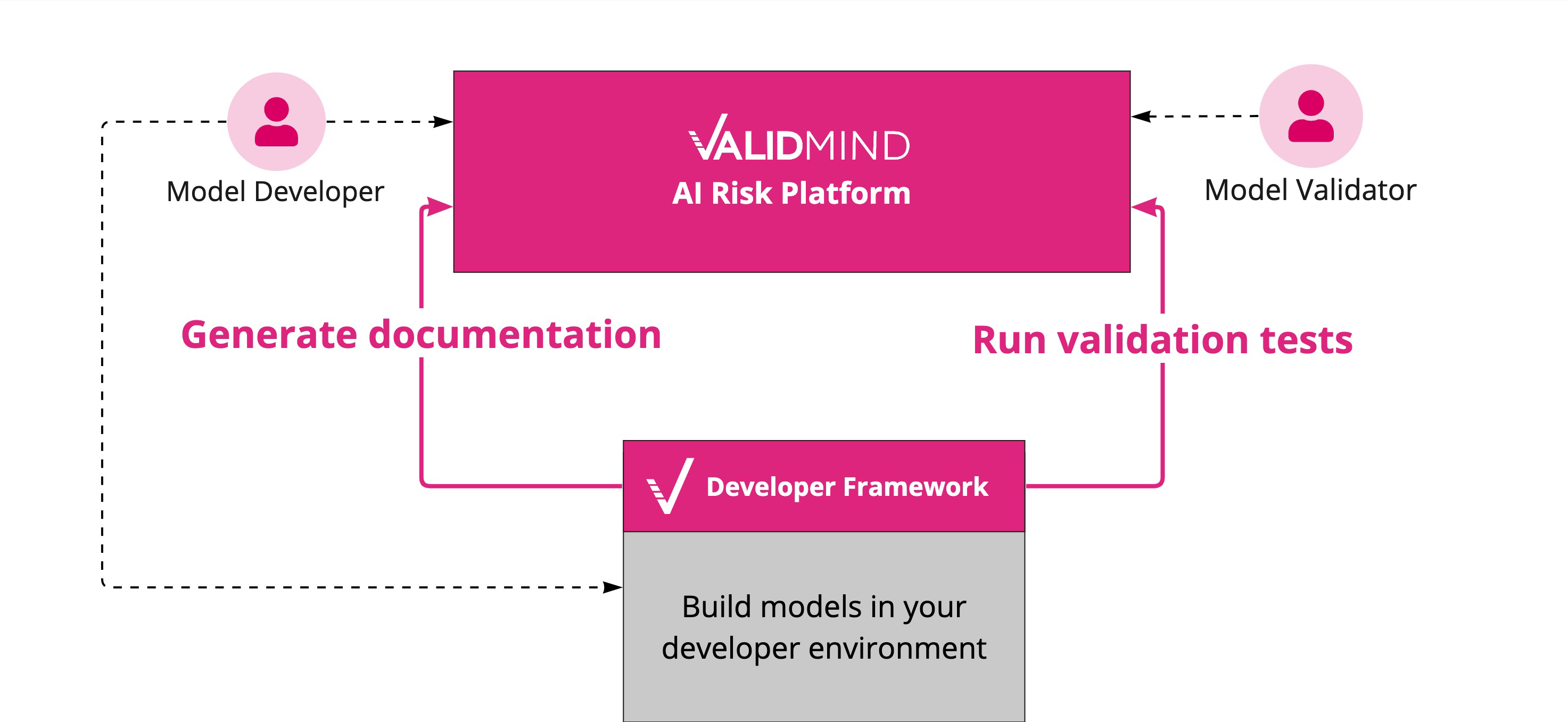
ValidMind offers two primary methods for documenting model risk:
By generating model documentation: Through automation, the framework extracts metadata from associated datasets and models for you and generates model documentation. You can also add more documentation and tests manually using the documentation editing capabilities in the ValidMind UI.
By running pre-built validation tests: The framework provides a suite of validation tests for common financial services use cases. For cases where these tests do not cover everything you need, you can also extend existing test suites with your own proprietary tests or testing providers.
The developer framework is designed to be model agnostic. If your model is built in Python, ValidMind’s Python client library already provides all the standard functionality you might need without requiring your developers to rewrite any functions.
How do I use the framework?
A typical high-level workflow for model developers consists of four major steps:
- Develop model
- In your existing developer environment, build one or more candidate models that need to be validated. This step includes all the usual activities you already follow as a model developer.
- Generate model documentation
- With the ValidMind Developer Framework, generate automated model documentation and run validation tests. This step includes making use of the automation and testing functionality provided by the framework and uploading the output to the Platform UI. You can iteratively regenerate the documentation as you work though the next step of refining your documentation.
- Refine model documentation
- In the ValidMind Platform UI, review the generated documentation and test output. Iterate over the documentation and test output to refine your model documentation. Collaborate with other developers and model validators to finalize the model documentation and get it ready for review.
- Submit for review
- In the ValidMind Platform UI, you submit the model documentation for review which moves the documentation workflow moves to the next phase where a model validator will review it.
How do I generate model documentation?
Before you can use the developer framework, you need to verify that the current documentation template contains all the necessary tests for the model you are developing:
The template might already be sufficient and you only need to run the template within the developer framework to populate documentation.
Or, more likely, the template might need additional tests that you can add these tests via the developer framework.
This process of verifying the suitability of the the current documentation template and adding more tests to the template is an iterative process:
graph LR
    A[Verify template] --> B[Build template]
    B --> D[Add tests and<br>content blocks]
    D --> E[Add external<br>test providers]
    E --> C[Run template]
    C --> B
- Build the template
- When the documentation template requires more tests to be added, or if the documentation template does not include a specific content or test block you need:
For functionality provided by the developer framework: Add the relevant tests or content blocks for the model use case.
For tests not provided by the framework: Add your own external test provider.
Run the template : When you have registered all the required tests as content blocks in the documentation template, populate the necessary model documentation by adding this call to your model:
run_documentation_tests()End-to end workflow
In your modeling environment
Build your model.
Export the datasets and model.
Next, go to With the developer framework, Step 2.
With the developer framework
Create a notebook to select and build the relevant tests.
From your modeling environment, load the trained datasets and models.
Use the instructions from In the Platform UI, Step 3, initialize the ValidMind Developer Framework.
Select the relevant tests.
Review if all tests are covered by ValidMind or your external test provider:
- If all tests are NOT covered: Create and register additional tests.
- If all tests are covered:
- Run the selected tests.
- Review your test results.
Next, go to In the ValidMind Platform UI, Step 5.
In the ValidMind Platform UI
Review the template structure.
Go to With the developer framework, Step 3.
After With the developer framework, Step 6, add content blocks to your model documentation:
Select the block type:
For test-driven blocks: Select from available test provider results
For text blocks:
- For new block:
- Add new editable text content block
- Review and collaborate on the content block
- For existing blocks: Select from available texts from content provider
- For new block: